Setting the file. One moment.
Verify error tracking
Recommended
Confirm events are being sent to PostHog
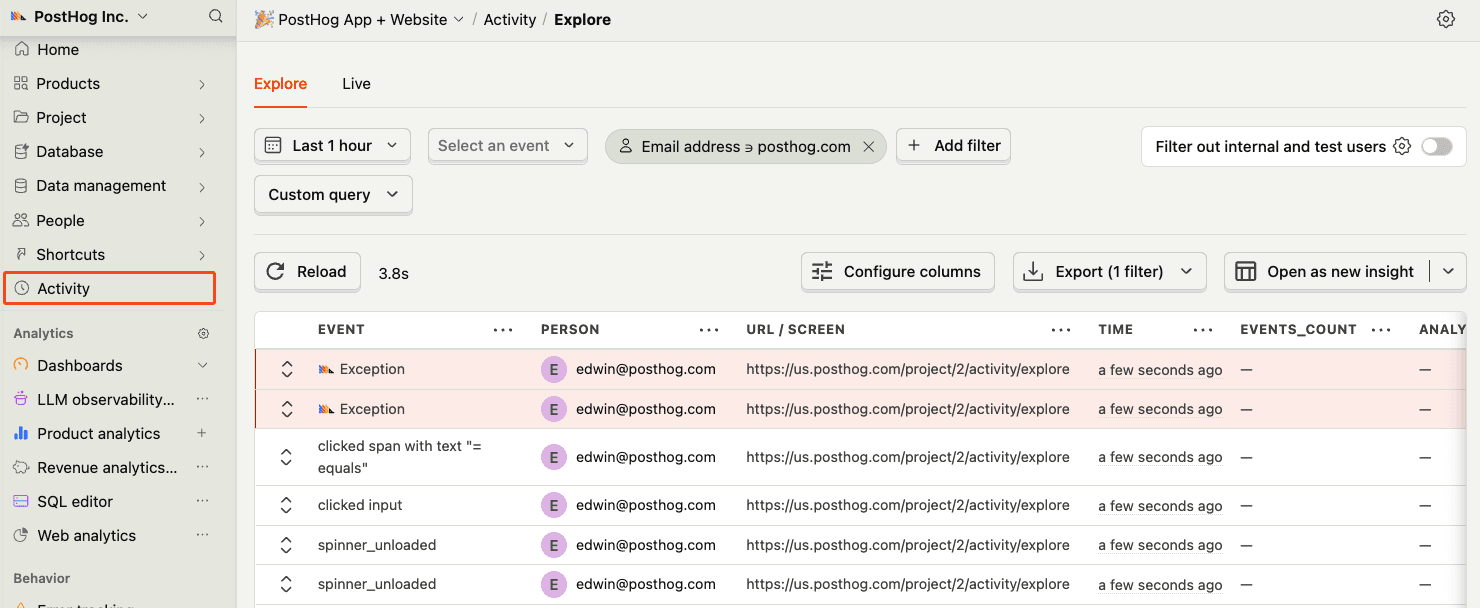
Before proceeding, let’s make sure exception events are being captured and sent to PostHog. You should see events appear in the activity feed.
Chapter 158 · Omnibus Instrument Error Tracking
Subchapter 158.12
references/nuxt.mdMarkdown5 KBView on GitHub
Required
Install the PostHog Nuxt module using your package manager:
PostHog AI
npm install @posthog/nuxtyarn add @posthog/nuxtpnpm add @posthog/nuxtbun add @posthog/nuxtAdd the module to your nuxt.config.ts file:
nuxt.config.ts
PostHog AI
export default defineNuxtConfig({
  modules: ['@posthog/nuxt'],
  // Enable source maps generation in both vue and nitro
  sourcemap: {
    client: 'hidden'
  },
  nitro: {
    rollupConfig: {
      output: {
        sourcemapExcludeSources: false,
      },
    },
  },
  posthogConfig: {
    publicKey: '<ph_project_token>', // Find it in project settings https://app.posthog.com/settings/project
    host: 'https://us.i.posthog.com', // Optional: defaults to https://us.i.posthog.com. Use https://eu.i.posthog.com for EU region
    clientConfig: {
      capture_exceptions: true, // Enables automatic exception capture on the client side (Vue)
    },
    serverConfig: {
      enableExceptionAutocapture: true, // Enables automatic exception capture on the server side (Nitro)
    },
    sourcemaps: {
      enabled: true,
      project: '<ph_project_id>', // Your project ID from PostHog settings https://app.posthog.com/settings/environment#variables
      personalApiKey: '<ph_personal_api_key>', // Your personal API key from PostHog settings https://app.posthog.com/settings/user-api-keys (requires organization:read and error_tracking:write scopes)
      releaseName: 'my-application', // Optional: defaults to git repository name
      releaseVersion: '1.0.0', // Optional: defaults to current git commit
    },
  },
})
Personal API Key
Your Personal API Key will require organization:read and error_tracking:write scopes.
The module will automatically:
2
Optional
Our module if set up as shown above already captures both client and server side exceptions automatically.
To send errors manually on the client side, import it and use the captureException method like this:
Vue
PostHog AI
<script>
  const { $posthog } = useNuxtApp()
  if ($posthog) {
    const posthog = $posthog()
    posthog.captureException(new Error("Important error message"))
  }
</script>
On the server side instantiate PostHog using:
server/api/example.js
PostHog AI
const runtimeConfig = useRuntimeConfig()
const posthog = new PostHog(
  runtimeConfig.public.posthogPublicKey,
  {
    host: runtimeConfig.public.posthogHost,
  }
);
try {
  const results = await DB.query.users.findMany()
  return results
} catch (error) {
3
Required
Build your project for production by running the following command:
Terminal
PostHog AI
nuxt buildThe PostHog module will automatically generate and upload source maps to PostHog during the build process.
Recommended
Confirm events are being sent to PostHog
Before proceeding, let’s make sure exception events are being captured and sent to PostHog. You should see events appear in the activity feed.
4
Required
Great, you’re capturing exceptions! If you serve minified bundles, the next step is to upload source maps to generate accurate stack traces.
Let’s continue to the next section.
Ask a question
HelpfulCould be better