Setting the file. One moment.
Verify error tracking
Recommended
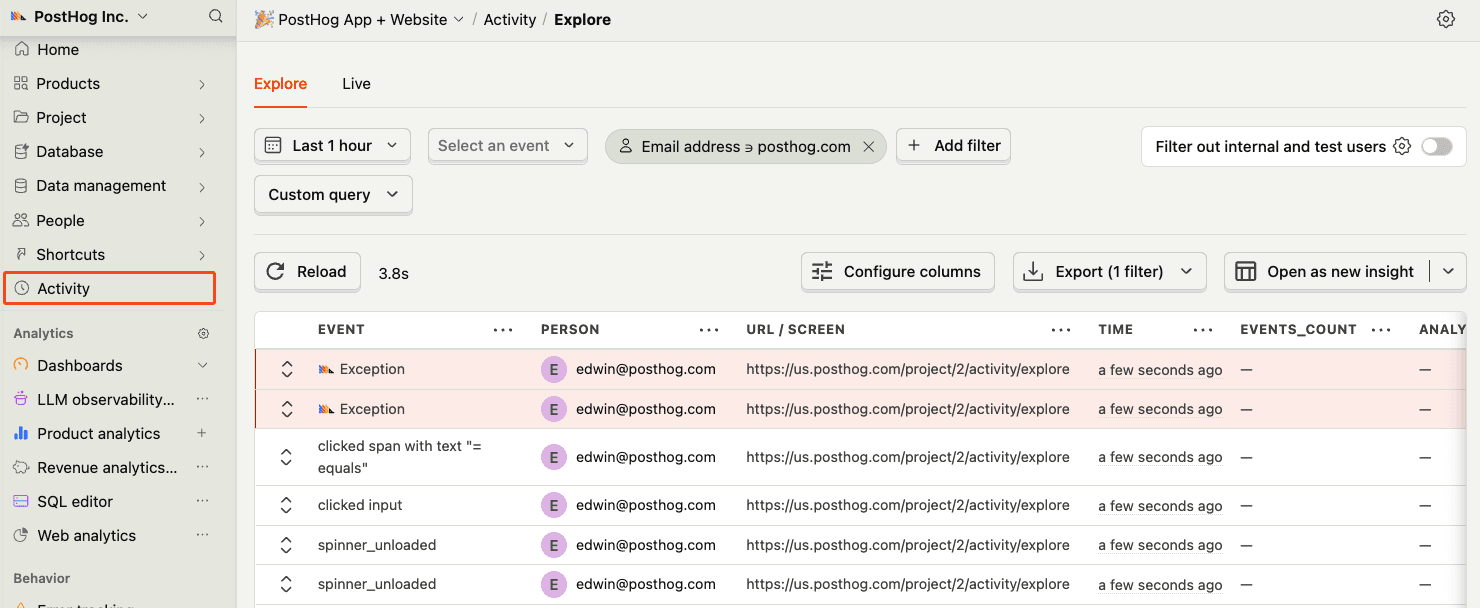
Confirm events are being sent to PostHog
Before proceeding, let’s make sure exception events are being captured and sent to PostHog. You should see events appear in the activity feed.
Chapter 158 · Omnibus Instrument Error Tracking
Subchapter 158.3
references/angular.mdMarkdown8 KBView on GitHub
Required
Install the PostHog JavaScript library using your package manager:
PostHog AI
npm install posthog-jsyarn add posthog-jspnpm add posthog-js2
Required
In your src/main.ts, initialize PostHog using your project token and instance address:
For Angular v17 and above, you can set up PostHog as a singleton service. To do this, start by creating and injecting a PosthogService instance.
Create a service by running ng g service services/posthog. The service should look like this:
src/main.ts
PostHog AI
// src/app/services/posthog.service.ts
import { DestroyRef, Injectable, NgZone } from "@angular/core";
import posthog from "posthog-js";
import { environment } from "../../environments/environment";
import { Router } from "@angular/router";
@Injectable({ providedIn: "root" })
export class PosthogService {
  constructor(
    private ngZone: NgZone,
The service is initialized outside of the Angular zone (opens in a new tab) to reduce change detection cycles. This is important to avoid performance issues with session recording. Then, inject the service in your app’s root component app.component.ts. This will make sure PostHog is initialized before any other component is rendered.
src/app/app.component.ts
PostHog AI
// src/app/app.component.ts
import { Component } from "@angular/core";
import { RouterOutlet } from "@angular/router";
import { PosthogService } from "./services/posthog.service";
@Component({
  selector: "app-root",
  styleUrls: ["./app.component.scss"],
  template: `
    <router-outlet />`,
In your src/main.ts, initialize PostHog using your project API key and instance address. You can find both in your project settings (opens in a new tab).
src/main.ts
PostHog AI
// src/main.ts
import { bootstrapApplication } from '@angular/platform-browser';
import { appConfig } from './app/app.config';
import { AppComponent } from './app/app.component';
import { environment } from "./environments/environment";
import posthog from 'posthog-js'
posthog.init(environment.posthogKey, {
  api_host: environment.posthogHost,
3
Click around and view a couple pages to generate some events. PostHog automatically captures pageviews, clicks, and other interactions for you.
If you’d like, you can also manually capture custom events:
JavaScript
PostHog AI
posthog.capture('my_custom_event', { property: 'value' })4
Recommended
Exception autocapture can be enabled during initialization of the PostHog client to automatically capture any exception thrown by your Angular application.
This requires overriding Angular’s default ErrorHandler provider:
src/app/posthog-error-handler.ts
PostHog AI
import { ErrorHandler, Injectable, Provider } from '@angular/core';
import { HttpErrorResponse } from '@angular/common/http';
import posthog from 'posthog-js';
@Injectable({ providedIn: 'root' })
class PostHogErrorHandler implements ErrorHandler {
  public constructor() {}
  public handleError(error: unknown): void {
Then, in your src/app/app.config.ts, import the providePostHogErrorHandler function and add it to the providers array:
src/app/app.config.ts
PostHog AI
// src/app/app.config.ts
import { ApplicationConfig, provideZoneChangeDetection } from '@angular/core';
import { provideRouter } from '@angular/router';
import { routes } from './app.routes';
import { providePostHogErrorHandler } from './posthog-error-handler';
export const appConfig: ApplicationConfig = {
  providers: [
    ...
5
Optional
If there are more errors you’d like to capture, you can manually call the captureException method:
TypeScript
PostHog AI
posthog.captureException(e, additionalProperties)Recommended
Confirm events are being sent to PostHog
Before proceeding, let’s make sure exception events are being captured and sent to PostHog. You should see events appear in the activity feed.
6
Required
Great, you’re capturing exceptions! If you serve minified bundles, the next step is to upload source maps to generate accurate stack traces.
Let’s continue to the next section.
Ask a question
HelpfulCould be better