Skill 76 · Instrument Error Tracking
Subchapter 76.17
references/nextjs.mdMarkdown13 KBView on GitHub
AI agents: this is one page from PostHog’s docs. Full index of Markdown docs for LLMs: https://posthog.com/llms.txt (opens in a new tab)
1
Required
Install the PostHog JavaScript library using your package manager:
npm install posthog-jsyarn add posthog-jspnpm add posthog-jsbun add posthog-js2
Required
Add your PostHog project token and host to your .env.local file and to your hosting provider (e.g. Vercel, Netlify). These values need to start with NEXT_PUBLIC_ to be accessible on the client-side.
.env.local
NEXT_PUBLIC_POSTHOG_PROJECT_TOKEN=<ph_project_token>
NEXT_PUBLIC_POSTHOG_HOST=https://us.i.posthog.com3
Required
Choose the integration method based on your Next.js version and router type.
If you’re using Next.js 15.3+, you can use instrumentation-client.ts for a lightweight, fast integration:
instrumentation-client.ts
import posthog from 'posthog-js'
posthog.init(process.env.
4
Recommended
Once initialized in instrumentation-client.ts, import posthog from posthog-js anywhere and call the methods you need:
app/checkout/page.tsx
'use client'
import posthog from 'posthog-js'
5
Required
PostHog can automatically capture unhandled exceptions in your Next.js app using the JavaScript Web SDK.
You can enable exception autocapture for the JavaScript Web SDK in the Error tracking section of your project settings (opens in a new tab).
It is also possible to manually capture exceptions using the captureException method:
JavaScript
posthog.captureException(error, additionalProperties)Manual capture is very useful if you already use error boundaries to handle errors in your app:
6
Required
Next.js enables you to both server-side render pages and add server-side functionality. To integrate PostHog into your Next.js app on the server-side, you can use the Node SDK (opens in a new tab).
First, install the posthog-node library:
npmRecommended
You should also see events and exceptions in PostHog coming from your server-side code in the activity feed.
7
Required
To capture errors that occur in your server-side code, you can set up an instrumentation.ts (opens in a new tab) file at the root of your project. This provides a onRequestError hook that you can use to capture errors.
Importantly, you need to:
posthog-node client in your server-side code. See our doc on setting up Next.js server-side analytics (opens in a new tab) for more.nodejs runtime to ensure PostHog works. You can call posthog.debug() to get verbose logging.distinct_id from the cookie to connect the error to a specific user.This looks like this:
JavaScript
Recommended
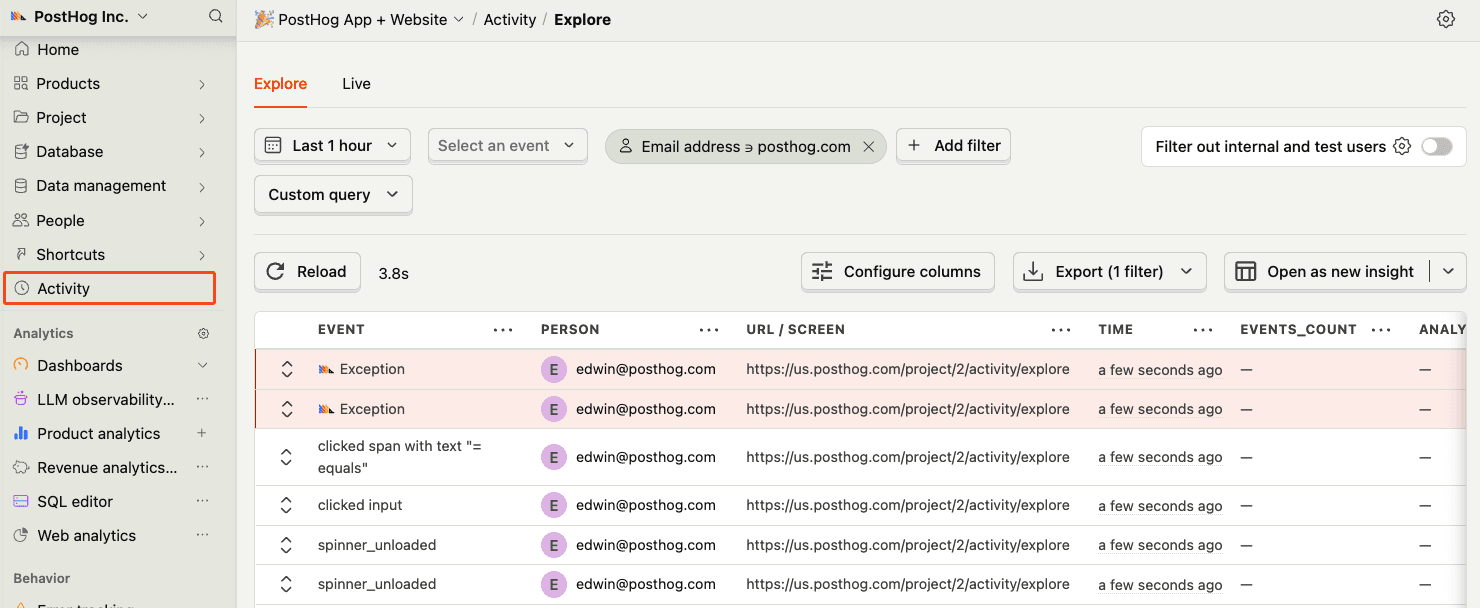
Confirm events are being sent to PostHog
Before proceeding, let’s make sure exception events are being captured and sent to PostHog. You should see events appear in the activity feed.
8
Required
Great, you’re capturing exceptions! If you serve minified bundles, the next step is to upload source maps to generate accurate stack traces.
Let’s continue to the next section.
Ask PostHog AI
HelpfulCould be better
For the App router, create a providers.tsx file in your app folder. The posthog-js library needs to be initialized on the client-side using the 'use client' directive:
app/providers.tsx
'use client'
import { usePathname, useSearchParams } from "next/navigation"
import { useEffect } from "react"
import posthog from 'posthog-js'
import { PostHogProvider as PHProvider } from '@posthog/react'
export function PostHogProvider({ children }: { children: React.ReactNode }) {
useEffect(() => {
posthog.init(process.env.NEXT_PUBLIC_POSTHOG_PROJECT_TOKEN as string, {
api_host: process.env.NEXT_PUBLIC_POSTHOG_HOST,
defaults: '2026-05-30'
})
}, [])
return (
<PHProvider client={posthog}>
{children}
</PHProvider>
)
}Then import the PostHogProvider component in your app/layout.tsx and wrap your app with it:
app/layout.tsx
import './globals.css'
import { PostHogProvider } from './providers'
export default function RootLayout({ children }: { children: React.ReactNode }) {
return (
<html lang="en">
<body>
<PostHogProvider>
{children}
</PostHogProvider>
</body>
</html>
)
}For the Pages router, integrate PostHog at the root of your app in pages/_app.tsx:
pages/_app.tsx
import { useEffect } from 'react'
import { Router } from 'next/router'
import posthog from 'posthog-js'
import { PostHogProvider } from '@posthog/react'
import type { AppProps } from 'next/app'
export default function App({ Component, pageProps }: AppProps) {
useEffect(() => {
posthog.init(process.env.NEXT_PUBLIC_POSTHOG_PROJECT_TOKEN as string, {
api_host: process.env.NEXT_PUBLIC_POSTHOG_HOST,
defaults: '2026-05-30',
loaded: (posthog) => {
if (process.env.NODE_ENV === 'development') posthog.debug()
}
})
}, [])
return (
<PostHogProvider client={posthog}>
<Component {...pageProps} />
</PostHogProvider>
)
}Defaults option
The defaults option automatically configures PostHog with recommended settings for new projects. See SDK defaults (opens in a new tab) for details.
Use the usePostHog hook to access PostHog in client components:
app/checkout/page.tsx
'use client'
import { usePostHog } from '@posthog/react'
export default function CheckoutPage() {
const posthog = usePostHog()
function handlePurchase() {
posthog.capture('purchase_completed', { amount: 99 })
}
return <button onClick={handlePurchase}>Complete purchase</button>
}Next.js uses error boundaries (opens in a new tab) to handle uncaught exceptions by rendering a fallback UI instead of the crashing components. To set one up, create a error.tsx file in any of your route directories. This triggers when there is an error rendering your component and should look like this:
error.tsx
"use client"
import posthog from "posthog-js"
import { useEffect } from "react"
export default function Error({
error,
reset,
}: {
error: Error & { digest?: string }
reset: () => void
}) {
useEffect(() => {
posthog.captureException(error)
}, [error])
return (
...
)
}You can also create a Global Error component (opens in a new tab) in your root layout to capture unhandled exceptions in your root layout.
app/global-error.tsx
'use client'
import posthog from "posthog-js"
import NextError from "next/error"
import { useEffect } from "react"
export default function GlobalError({
error,
reset,
}: {
error: Error & { digest?: string }
reset: () => void
}) {
useEffect(() => {
posthog.captureException(error)
}, [error])
return (
// global-error must include html and body tags
<html>
<body>
{/* `NextError` is the default Next.js error page component */}
<NextError statusCode={0} />
</body>
</html>
)
}For Pages Router, you can use React’s Error Boundaries (opens in a new tab) to catch JavaScript errors anywhere in the component tree. Create a custom error boundary component and report errors to PostHog in the componentDidCatch method:
components/ErrorBoundary.tsx
componentDidCatch(error, errorInfo) {
posthog.captureException(error)
}Then wrap your app or specific components with the error boundary:
pages/_app.tsx
import type { AppProps } from 'next/app'
import ErrorBoundary from '../components/ErrorBoundary'
export default function App({ Component, pageProps }: AppProps) {
return (
<ErrorBoundary>
<Component {...pageProps} />
</ErrorBoundary>
)
}yarn add posthog-nodepnpm add posthog-nodebun add posthog-nodeFor the backend, we can create a lib/posthog-server.js file. In it, initialize PostHog from posthog-node as a singleton with your project token and host from your project settings (opens in a new tab).
This looks like this:
lib/posthog-server.js
import { PostHog } from 'posthog-node'
let posthogInstance = null
export function getPostHogServer() {
if (!posthogInstance) {
posthogInstance = new PostHog(
process.env.NEXT_PUBLIC_POSTHOG_PROJECT_TOKEN,
{
host: process.env.NEXT_PUBLIC_POSTHOG_HOST,
flushAt: 1,
flushInterval: 0,
}
)
}
return posthogInstance
}You can now use the getPostHogServer function to capture exceptions in server-side code.
JavaScript
const posthog = getPostHogServer()
try {
throw new Error("This is a test exception for error tracking")
} catch (error) {
posthog.captureException(error, {
source: 'test',
user_id: 'test-user-123',
})
}// instrumentation.js
export function register() {
// No-op for initialization
}
export const onRequestError = async (err, request, context) => {
if (process.env.NEXT_RUNTIME === 'nodejs') {
const { getPostHogServer } = require('./lib/posthog-server')
const posthog = getPostHogServer()
let distinctId = null
if (request.headers.cookie) {
// Normalize multiple cookie arrays to string
const cookieString = Array.isArray(request.headers.cookie)
? request.headers.cookie.join('; ')
: request.headers.cookie
const postHogCookieMatch = cookieString.match(/ph_phc_.*?_posthog=([^;]+)/)
if (postHogCookieMatch && postHogCookieMatch[1]) {
try {
const decodedCookie = decodeURIComponent(postHogCookieMatch[1])
const postHogData = JSON.parse(decodedCookie)
distinctId = postHogData.distinct_id
} catch (e) {
console.error('Error parsing PostHog cookie:', e)
}
}
}
await posthog.captureException(err, distinctId || undefined)
}
}You can find a full example of both this and client-side error tracking in our Next.js error monitoring tutorial (opens in a new tab).