Setting the file. One moment.
-
1
Choose an installation method
Required
You can either add the JavaScript snippet directly to your HTML or install the JavaScript SDK via your package manager.
HTML snippet
Add this snippet to your website within the
<head>tag. This can also be used in services like Google Tag Manager:HTML
<script>
    !function(t,e){var o,n,p,r;e.__SV||(window.posthog && window.posthog.__loaded)||(window.posthog=e,e._i=[],e.init=function(i,s,a){function g(t,e){var o=e.split(
JavaScript SDK
Install the PostHog JavaScript library using your package manager. Then, import and initialize the PostHog library with your project token and host:
npm
npm install posthog-jsyarn
yarn add posthog-jspnpm
pnpm add posthog-jsbun
bun add posthog-jsJavaScript
import posthog from 'posthog-js' posthog.init('<ph_project_token>', { api_host: 'https://us.i.posthog.com', defaults: '2026-05-30' }) -
2
Send events
Recommended
Once installed, PostHog will automatically start capturing events. You can also manually send events to test your integration:
Click around and view a couple pages to generate some events. PostHog automatically captures pageviews, clicks, and other interactions for you.
If you’d like, you can also manually capture custom events:
JavaScript
posthog.capture('my_custom_event', { property: 'value' }) -
3
Set up exception autocapture
Recommended
You can enable exception autocapture for the JavaScript Web SDK in the Error tracking section of your project settings (opens in a new tab).
When enabled, this automatically captures
$exceptionevents when errors are thrown by wrapping thewindow.onerrorandwindow.onunhandledrejectionlisteners. -
4
Manually capture exceptions
Optional
It is also possible to manually capture exceptions using the
captureExceptionmethod:JavaScript
posthog.captureException(error, additionalProperties)This is helpful if you’ve built your own error handling logic or want to capture exceptions that are handled by your application code.
-
Verify error tracking
Recommended
Confirm events are being sent to PostHog
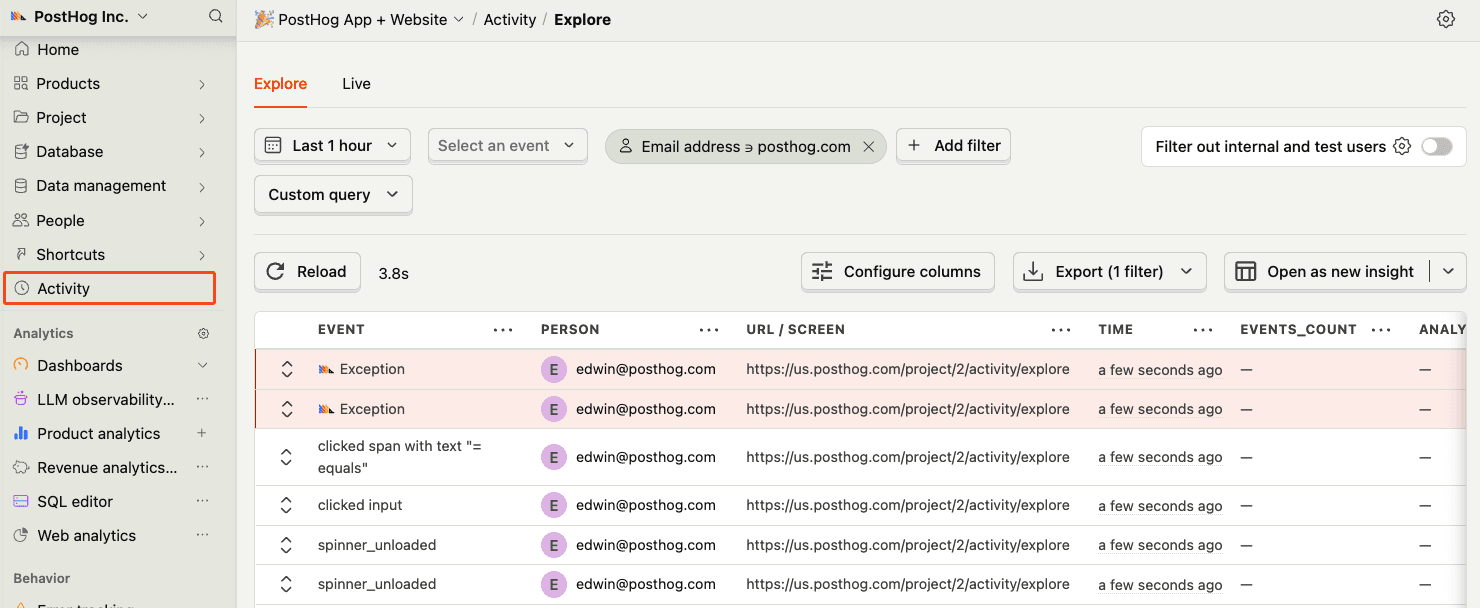
Before proceeding, let’s make sure exception events are being captured and sent to PostHog. You should see events appear in the activity feed.
-
5
Upload source maps
Required
Great, you’re capturing exceptions! If you serve minified bundles, the next step is to upload source maps to generate accurate stack traces.
Let’s continue to the next section.