Chapter 48 · Instrument LLM Analytics
Subchapter 48.21
references/manual-capture.mdMarkdown17 KBView on GitHub
If you’re using a different server-side SDK or prefer to use the API, you can manually capture the data by calling the capture method or using the capture API (opens in a new tab).
curl -X POST "https://us.i.posthog.com/i/v0/e/" \
-H "Content-Type: application/json" \
-d '{
"api_key": "<ph_project_token>",
"event": "$ai_generation",
"properties": {
"distinct_id": "user_123",
"$ai_trace_id": "trace_id_here",
"$ai_model": "gpt-5-mini",
"$ai_provider": "openai",
"$ai_input": [{"role": "user", "content": "Tell me a fun fact about hedgehogs"}],
"$ai_input_tokens": 10,
"$ai_output_choices": [{"role": "assistant", "content": "Hedgehogs have around 5,000 to 7,000 spines on their backs!"}],
"$ai_output_tokens": 20,
"$ai_latency": 1.5,
"$ai_stream": true,
"$ai_time_to_first_token": 0.25
}
}'npm install posthog-nodeimport { PostHog } from 'posthog-node'
const client = new PostHog('<ph_project_token>', {
host: 'https://us.i.posthog.com'
})// After your LLM call
client.capture({
distinctId: 'user_123',
event: '$ai_generation',
properties: {
$ai_trace_id: 'trace_id_here',
$ai_model: 'gpt-5-mini',
$ai_provider: 'openai',
$ai_input: [{ role: 'user', content: 'Tell me a fun fact about hedgehogs' }],
$ai_input_tokens: 10,
$ai_output_choices: [{ role: 'assistant', content: 'Hedgehogs have around 5,000 to 7,000 spines on their backs!' }],
$ai_output_tokens: 20,
$ai_latency: 1.5,
// For streaming responses, also include:
// $ai_stream: true,
// $ai_time_to_first_token: 0.25
}
})
client.shutdown()pip install posthogfrom posthog import Posthog
posthog = Posthog("<ph_project_token>", host="https://us.i.posthog.com")# After your LLM call
posthog.capture(
distinct_id='user_123',
event='$ai_generation',
properties={
'$ai_trace_id': 'trace_id_here',
'$ai_model': 'gpt-5-mini',
'$ai_provider': 'openai',
'$ai_input': [{'role': 'user', 'content': 'Tell me a fun fact about hedgehogs'}],
'$ai_input_tokens': 10,
'$ai_output_choices': [{'role': 'assistant', 'content': 'Hedgehogs have around 5,000 to 7,000 spines on their backs!'}],
'$ai_output_tokens': 20,
'$ai_latency': 1.5,
# For streaming responses, also include:
# '$ai_stream': True,
# '$ai_time_to_first_token': 0.25
}
)go get github.com/posthog/posthog-goimport "github.com/posthog/posthog-go"
client, _ := posthog.NewWithConfig("<ph_project_token>", posthog.Config{
Endpoint: "https://us.i.posthog.com",
})
defer client.Close()// After your LLM call
client.Enqueue(posthog.Capture{
DistinctId: "user_123",
Event: "$ai_generation",
Properties: map[string]interface{}{
"$ai_trace_id": "trace_id_here",
"$ai_model": "gpt-5-mini",
"$ai_provider": "openai",
"$ai_input_tokens": 10,
"$ai_output_tokens": 20,
"$ai_latency": 1.5,
// For streaming responses, also include:
// "$ai_stream": true,
// "$ai_time_to_first_token": 0.25,
},
})gem install posthog-rubyrequire 'posthog'
posthog = PostHog::Client.new({
api_key: '<ph_project_token>',
host: 'https://us.i.posthog.com'
})# After your LLM call
posthog.capture({
distinct_id: 'user_123',
event: '$ai_generation',
properties: {
'$ai_trace_id' => 'trace_id_here',
'$ai_model' => 'gpt-5-mini',
'$ai_provider' => 'openai',
'$ai_input_tokens' => 10,
'$ai_output_tokens' => 20,
'$ai_latency' => 1.5
# For streaming responses, also include:
# '$ai_stream' => true,
# '$ai_time_to_first_token' => 0.25
}
})composer require posthog/posthog-php<?php
require_once __DIR__ . '/vendor/autoload.php';
use PostHog\PostHog;
PostHog::init('<ph_project_token>', [
'host' => 'https://us.i.posthog.com'
]);// After your LLM call
PostHog::capture([
'distinctId' => 'user_123',
'event' => '$ai_generation',
'properties' => [
'$ai_trace_id' => 'trace_id_here',
'$ai_model' => 'gpt-5-mini',
'$ai_provider' => 'openai',
'$ai_input_tokens' => 10,
'$ai_output_tokens' => 20,
'$ai_latency' => 1.5
// For streaming responses, also include:
// '$ai_stream' => true,
// '$ai_time_to_first_token' => 0.25
]
]);2
Each event type has specific properties. See the tabs below for detailed property documentation for each event type.
A generation is a single call to an LLM.
Event name: $ai_generation
| Property | Description |
|---|---|
| $ai_trace_id | The trace ID (a UUID to group AI events) like conversation_idMust contain only letters, numbers, and special characters: -, _, ~, ., @, (, ), !, ‘, :, |Example: d9222e05-8708-41b8-98ea-d4a21849e761 |
| $ai_session_id | (Optional) Groups related traces together. Use this to organize traces by whatever grouping makes sense for your application (user sessions, workflows, conversations, or other logical boundaries).Example: session-abc-123, conv-user-456 |
| $ai_span_id | (Optional) Unique identifier for this generation |
| $ai_span_name | (Optional) Name given to this generationExample: summarize_text |
| $ai_parent_id | (Optional) Parent span ID for tree view grouping |
| $ai_model | The model usedExample: gpt-5-mini |
| $ai_provider | The LLM providerExample: openai, anthropic, gemini |
| $ai_input_tokens | The number of tokens in the input (often found in response.usage) |
| $ai_output_tokens | The number of tokens in the output (often found in response.usage) |
| $ai_latency | (Optional) The latency of the LLM call in seconds |
| $ai_time_to_first_token | (Optional) Time to first token in seconds. Only applicable for streaming responses. |
| $ai_http_status | (Optional) The HTTP status code of the response |
| $ai_base_url | (Optional) The base URL of the LLM providerExample: https://api.openai.com/v1 (opens in a new tab) |
| $ai_request_url | (Optional) The full URL of the request made to the LLM APIExample: https://api.openai.com/v1/chat/completions |
Cost properties are optional as we can automatically calculate them from model and token counts. If you want, you can provide your own cost properties or custom pricing instead.
| Property | Description |
|---|---|
| $ai_input_cost_usd | (Optional) The cost in USD of the input tokens |
| $ai_output_cost_usd | (Optional) The cost in USD of the output tokens |
| $ai_request_cost_usd | (Optional) The cost in USD for the requests |
| $ai_web_search_cost_usd | (Optional) The cost in USD for the web searches |
| $ai_total_cost_usd | (Optional) The total cost in USD (sum of all cost components) |
| Property | Description |
|---|---|
| $ai_input_token_price | (Optional) Price per input token (used to calculate $ai_input_cost_usd) |
| $ai_output_token_price | (Optional) Price per output token (used to calculate $ai_output_cost_usd) |
| $ai_cache_read_token_price | (Optional) Price per cached token read |
| $ai_cache_write_token_price | (Optional) Price per cached token write |
| $ai_request_price | (Optional) Price per request |
| $ai_request_count | (Optional) Number of requests (defaults to 1 if $ai_request_price is set) |
| $ai_web_search_price | (Optional) Price per web search |
| $ai_web_search_count | (Optional) Number of web searches performed |
| Property | Description |
|---|---|
| $ai_cache_read_input_tokens | (Optional) Number of tokens read from cache |
| $ai_cache_creation_input_tokens | (Optional) Number of tokens written to cache (Anthropic-specific) |
| $ai_cache_reporting_exclusive | (Optional) Whether cache tokens are excluded from $ai_input_tokens. When true, cache tokens are separate from input tokens. When false, input tokens already include cache tokens. Defaults to true for Anthropic provider or Claude models, false otherwise. |
| Property | Description |
|---|---|
| $ai_temperature | (Optional) Temperature parameter used in the LLM request |
| $ai_stream | (Optional) Whether the response was streamed |
| $ai_max_tokens | (Optional) Maximum tokens setting for the LLM response |
A trace is a group that contains multiple spans, generations, and embeddings. Traces can be manually sent as events or appear as pseudo-events automatically created from child events.
Event name: $ai_trace
| Property | Description |
|---|---|
| $ai_trace_id | The trace ID (a UUID to group related AI events together)Must contain only letters, numbers, and special characters: -, _, ~, ., @, (, ), !, ‘, :, |Example: d9222e05-8708-41b8-98ea-d4a21849e761 |
| $ai_session_id | (Optional) Groups related traces together. Use this to organize traces by whatever grouping makes sense for your application (user sessions, workflows, conversations, or other logical boundaries).Example: session-abc-123, conv-user-456 |
| $ai_latency | (Optional) The latency of the trace in seconds |
| $ai_span_name | (Optional) The name of the traceExample: chat_completion, rag_pipeline |
| $ai_is_error | (Optional) Boolean to indicate if the trace encountered an error |
| $ai_error | (Optional) The error message or object if the trace failed |
When you send generation ($ai_generation), span ($ai_span), or embedding ($ai_embedding) events with a $ai_trace_id, PostHog automatically creates a pseudo-trace event that appears in the dashboard as a parent grouping. These pseudo-traces:
$ai_trace eventThis means you can either:
$ai_trace events to control the trace metadataA span is a single action within your application, such as a function call or vector database search.
Event name: $ai_span
| Property | Description |
|---|---|
| $ai_trace_id | The trace ID (a UUID to group related AI events together)Must contain only letters, numbers, and the following characters: -, _, ~, ., @, (, ), !, ‘, :, |Example: d9222e05-8708-41b8-98ea-d4a21849e761 |
| $ai_session_id | (Optional) Groups related traces together. Use this to organize traces by whatever grouping makes sense for your application (user sessions, workflows, conversations, or other logical boundaries).Example: session-abc-123, conv-user-456 |
| $ai_span_id | (Optional) Unique identifier for this spanExample: bdf42359-9364-4db7-8958-c001f28c9255 |
| $ai_span_name | (Optional) The name of the spanExample: vector_search, data_retrieval, tool_call |
| $ai_parent_id | (Optional) Parent ID for tree view grouping (trace_id or another span_id)Example: 537b7988-0186-494f-a313-77a5a8f7db26 |
| $ai_latency | (Optional) The latency of the span in secondsExample: 0.361 |
| $ai_is_error | (Optional) Boolean to indicate if the span encountered an error |
An embedding is a single call to an embedding model to convert text into a vector representation.
Event name: $ai_embedding
| Property | Description |
|---|---|
| $ai_trace_id | The trace ID (a UUID to group related AI events together). Must contain only letters, numbers, and special characters: -, _, ~, ., @, (, ), !, ‘, :, |Example: d9222e05-8708-41b8-98ea-d4a21849e761 |
| $ai_session_id | (Optional) Groups related traces together. Use this to organize traces by whatever grouping makes sense for your application (user sessions, workflows, conversations, or other logical boundaries).Example: session-abc-123, conv-user-456 |
| $ai_span_id | (Optional) Unique identifier for this embedding operation |
| $ai_span_name | (Optional) Name given to this embedding operationExample: embed_user_query, index_document |
| $ai_parent_id | (Optional) Parent span ID for tree-view grouping |
| $ai_model | The embedding model usedExample: text-embedding-3-small, text-embedding-ada-002 |
| $ai_provider | The LLM providerExample: openai, cohere, voyage |
| $ai_input | The text to embedExample: “Tell me a fun fact about hedgehogs” or array of strings for batch embeddings |
| $ai_input_tokens | The number of tokens in the input |
| $ai_latency | (Optional) The latency of the embedding call in seconds |
| $ai_http_status | (Optional) The HTTP status code of the response |
| $ai_base_url | (Optional) The base URL of the LLM providerExample: https://api.openai.com/v1 (opens in a new tab) |
| $ai_request_url | (Optional) The full URL of the request made to the embedding APIExample: https://api.openai.com/v1/embeddings |
Cost properties are optional as we can automatically calculate them from model and token counts. If you want, you can provide your own cost property instead.
| Property | Description |
|---|---|
| $ai_input_cost_usd | (Optional) Cost in USD for input tokens |
| $ai_output_cost_usd | (Optional) Cost in USD for output tokens (usually 0 for embeddings) |
| $ai_total_cost_usd | (Optional) Total cost in USD |
Recommended
Confirm LLM events are being sent to PostHog
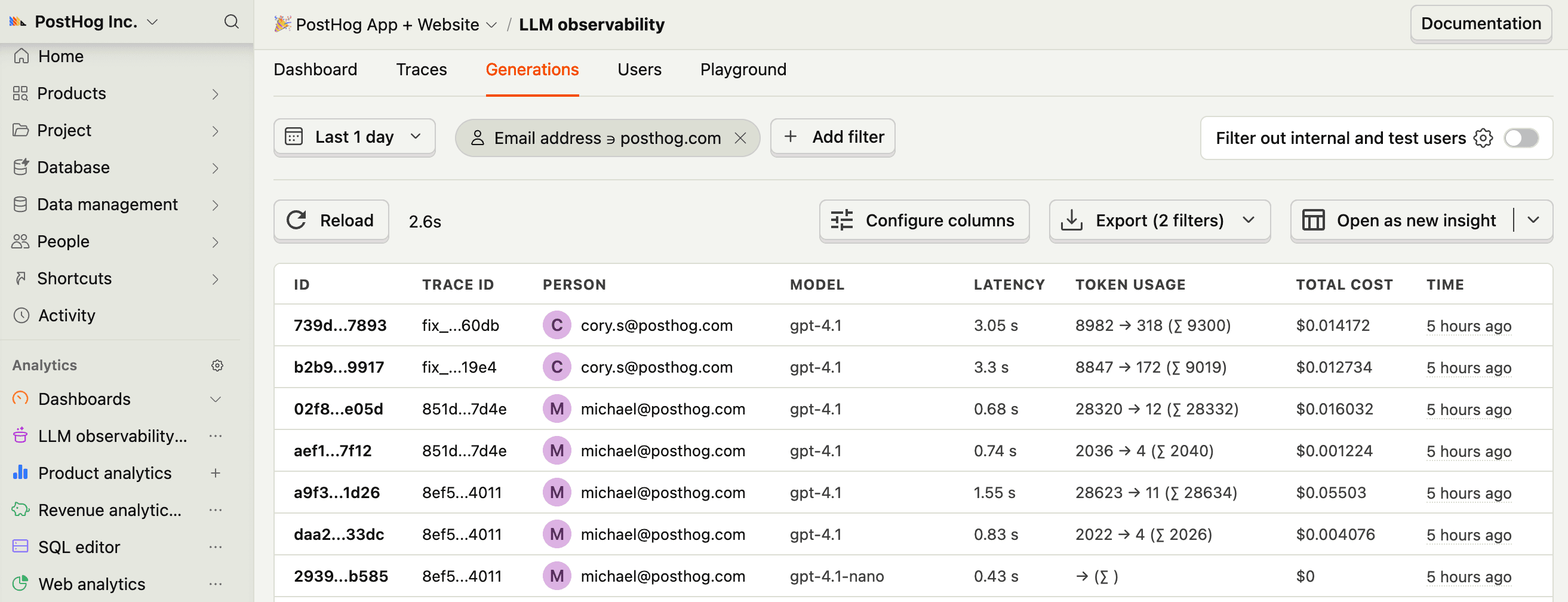
Let’s make sure LLM events are being captured and sent to PostHog. Under AI Observability, you should see rows of data appear in the Traces and Generations tabs.


3
Recommended
Now that you’re capturing AI conversations, continue with the resources below to learn what else AI Observability enables within the PostHog platform.
| Resource | Description |
|---|---|
| Basics (opens in a new tab) | Learn the basics of how LLM calls become events in PostHog. |
| Generations (opens in a new tab) | Read about the $ai_generation event and its properties. |
| Traces (opens in a new tab) | Explore the trace hierarchy and how to use it to debug LLM calls. |
| Spans (opens in a new tab) | Review spans and their role in representing individual operations. |
| Anaylze LLM performance (opens in a new tab) | Learn how to create dashboards to analyze LLM performance. |
Ask a question
HelpfulCould be better
| $ai_is_error | (Optional) Boolean to indicate if the request was an error |
| $ai_error | (Optional) The error message or object |
| $ai_stop_reason | (Optional) The reason the model stopped generating tokensExample: end_turn, stop, max_tokens, tool_use |
| $ai_is_error | (Optional) Boolean to indicate if the request was an error |
| $ai_error | (Optional) The error message or object if the embedding failed |