Setting the skill. One moment.
Credited skills
Skill 40 of 41
N8n:testmax N8n AI
Runs one workflow prompt through Instance AI, Claude Code with the n8n MCP server, and Codex with the n8n MCP server on a local n8n instance.
25 minutes · 5,513 words · 17 sections
Compare workflow builders
This skill sends the same prompt to up to three builders on the local n8n instance. The builders run at the same time, and a local page shows them live. It then builds one page that shows, for each run:
- the result against the expected outcome (pass, partial or fail, with reasons and the evidence that a panel of blind judges cited)
- deterministic checks of each workflow: the node definitions, the node issues in the n8n editor, the graph, the expression references, and a run of each branch with pinned data
- a separate n8n standards score, from the rules in n8n-io/skills (opens in a new tab) and the workflow-sdk best practices. This score does not change the verdict
- the canvas of the workflow that the builder made
- a replay of the run: the exact terminal screen, or a video of the n8n UI
- the cost
- the LLM steps: one entry for each LLM call, with its tokens (cache read, cache write, uncached input, output) and the agent text, reasoning and tool calls (with input and output) that the call made
The page uses the light mode of the n8n brand guidelines (opens in a new tab).
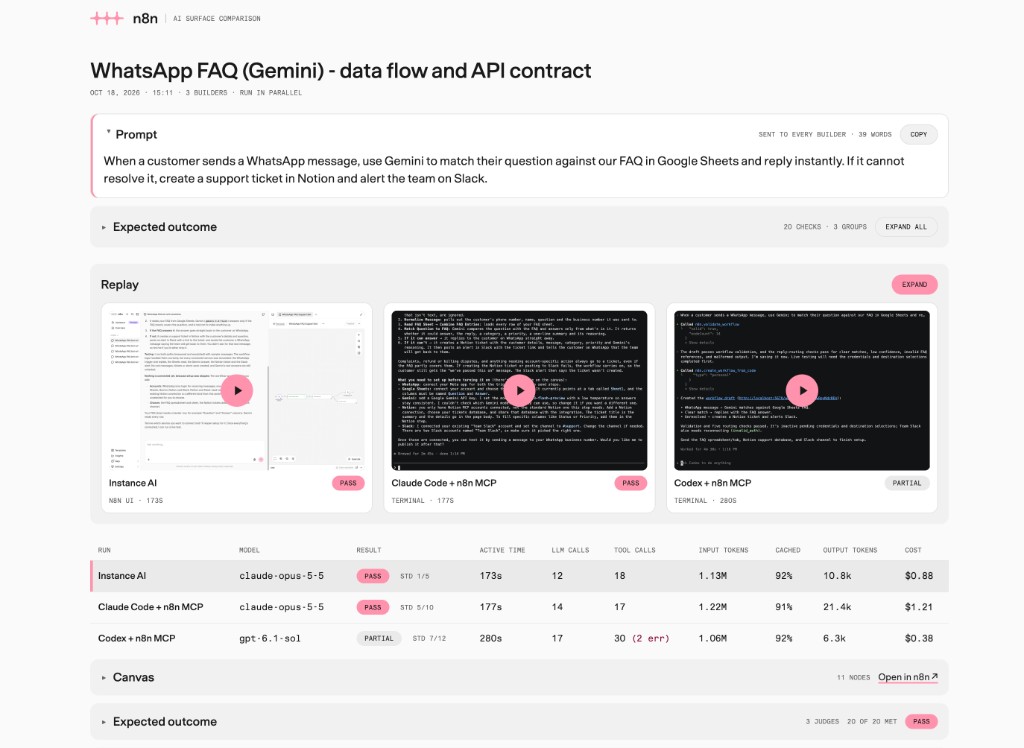
All scripts are in scripts/ next to this file. They use only the Python
standard library and the Playwright copy in the repository.
S="$(git rev-parse --show-toplevel)/.agents/skills/testmax-n8n-ai/scripts"Compare two n8n builds instead
This skill compares builders on one instance. To compare two builds of Instance
AI, for example master and your branch, use pnpm eval:ab-bench in
packages/@n8n/instance-ai (see its
README (opens in a new tab)).
It runs the one-turn cases through this skill’s compare.py --builders iai, so
the deterministic checks are the same, and it adds per-call token reports and a
table that compares the two builds. To measure only the static context of a
prompt, skill, or tool change, run pnpm context:budget in the same package.
Settings
All settings are in .env.ai-surfaces in the repository root. Git ignores
this file. The template is .env.ai-surfaces.example, also in the
repository root. The scripts read,
from low to high priority: .env.local, .env.ai-surfaces, the shell
environment. Empty values are ignored. Thus keys that are already in
.env.local work without a change.
If .env.ai-surfaces does not exist, copy .env.ai-surfaces.example to it. Tell the user
which values to fill in. Never read the values back to the user, never print
them, and never put a secret on a command line.
The most important settings:
| Setting | Use |
|---|---|
COMPARE_BUILDERS | Default builders, for example iai,claude,codex |
COMPARE_PARALLEL | 1 (default) runs the builders at the same time. 0 runs them one at a time |
COMPARE_LIVE | 1 (default) opens a live page of the runs. 0 turns it off |
COMPARE_LIVE_WINDOWS | 1 also opens the Instance AI thread and a terminal window for each CLI. Default 0 |
COMPARE_RECORD | 1 (default) records the Instance AI video for the replay. 0 turns it off |
COMPARE_CLI_MODE | interactive (default) records the real CLI screen. headless uses the JSON event stream |
COMPARE_RECORD_REQUESTS | 1 (default) records the Codex request bodies, without headers, for the tool list. 0 turns it off |
COMPARE_SCENARIOS | 1 (default) runs each workflow with pinned data through the n8n MCP server. 0 turns it off |
COMPARE_WIRE | 1 (default) runs each workflow in process with recorded API fixtures (run_wire.mjs). 0 turns it off |
COMPARE_BINARY_CHECKS | 1 (default) runs the deterministic binary checks of the Instance AI eval suite. 0 turns it off |
GOOGLE_GENERATIVE_AI_API_KEY, OPENAI_API_KEY, ANTHROPIC_API_KEY, MISTRAL_API_KEY, GROQ_API_KEY | Model keys for the real AI runs. A workflow model without a key skips those runs |
CLAUDE_MODEL, CODEX_MODEL | Model ids. Empty uses the CLI default. A prefix such as anthropic/ is removed |
CODEX_REASONING_EFFORT | Reasoning effort of Codex: minimal, low, medium (default), high or xhigh. The Effort column of the page shows the effort of each run |
COMPARE_CLAUDE_TOOLS | none (default) gives Claude Code only the n8n tools. default also gives it its built-in tools, all allowed (see “How the builders run”) |
CLAUDE_API_KEY | Anthropic key for Claude Code. Falls back to ANTHROPIC_API_KEY |
CODEX_API_KEY | OpenAI key for Codex. Falls back to OPENAI_API_KEY |
N8N_MCP_TOKEN | MCP key of the n8n user. Optional |
LANGSMITH_* | Instance AI cost and tokens |
1. Ask the user
Ask for these two items. If the harness has a structured question tool, use it. If not, ask in chat. Do not guess them.
- Prompt. The exact text to send to each builder.
- Expected outcome. What a correct result does. Ask for concrete checks, for example “WhatsApp trigger”, “Gemini compares the question to the FAQ sheet”, “the false branch makes a Notion ticket and a Slack message”.
Use the builders and models from the settings. Ask about them only if the user wants a change for this run.
Write one expected outcome item on each line, numbered or bulleted. The number of an item is its id: the judges cite it, and the page groups the checks by it.
Then write the scenarios for the pinned-data runs, from the expected outcome. You do not need to ask the user for them. A scenario sets the data of the trigger, the service nodes and the AI nodes, and says which nodes must or must not run. Logic nodes (IF, Switch, Set, Code, Aggregate and others) run for real. Make one scenario for each branch of the expected outcome:
{
  "pinByType": {
    "googleSheets": [{ "Question": "What are your opening hours?", "Answer": "9:00 to 17:00" }]
  },
  "scenarios": [
    { "name": "The FAQ answers the question", "ai": { "booleans": true },
      "expect": { "reach": ["whatsApp"], "skip": ["notion", "slack"] } },
    { "name": "The FAQ does not answer the question", "ai": { "booleans": false },
      "expect": { "reach": ["notion", "slack"] } }
  ]
}pinByType: output items for every node of a type, in all scenarios. A type is the full name or the part after the last dot. A scenario can have its ownpinByType.trigger: output items of the trigger. Without it, the trigger gets a fixture in the shape that the trigger code emits (WhatsApp, Webhook, Chat, Schedule, Telegram, Form and Manual triggers have one).ai: the output of each AI node.booleanssets every boolean in the output,setsets fields, andtextsets the whole text of a node without a structured output parser. The output follows the schema of the structured output parser, or the JSON example in the prompt of the node.expect:reachlists node types that must run without an error,skiplists node types that must not run.triggerNode: the name of the trigger that the scenario starts from, for a workflow with more than one trigger. Without it, the scenario starts from the trigger that reaches the mostreachtypes.
Without a scenarios file, run_scenarios.py makes one scenario for each
value of the AI booleans, with no expectations.
run_wire.mjs runs the same scenarios in process. There, service nodes
send real requests that recorded fixtures answer, so a scenario can also
check the API contract. Add these keys to the scenarios file:
{
  "scenarios": [
    { "name": "The FAQ does not answer the question", "ai": { "booleans": false },
      "expect": { "reach": ["notion", "slack"], "requests": [
        { "type": "notion", "method": "POST", "contains": ["\"title\"", "@trigger.messages[0].from"] },
        { "type": "slack", "method": "POST",
          "contains": ["@trigger.messages[0].text.body", ["@response.notion.id", "@response.notion.url"]] } ] } }
  ],
  "edge": [
    { "name": "The FAQ sheet is empty", "pinByType": { "googleSheets": [] }, "ai": { "booleans": false },
      "expect": { "reach": ["notion", "slack"] } }
  ],
  "questions": [
    { "name": "Opening hours, which the FAQ answers", "message": "Hi! What time do you open?",
      "expect": { "skip": ["notion"], "requests": [
        { "type": "whatsApp", "method": "POST", "contains": ["@trigger.messages[0].from", "9:00"] } ] } }
  ]
}expect.requests: each entry needs a request from a node oftype, optionally withmethodand an exactcount, whose URL, query or body contains every value incontains. An array incontainsmeans any one of its values.@trigger.<path>is a value of the trigger item.@response.<type>.<path>is a value of the response to the last write request of that node type, for example the id of the Notion page.expect.noWrites: the scenario must send no write request.edge: inputs that the prompt does not describe. The trigger kits insdk.mjsadd standard edge cases, for example two WhatsApp messages in one webhook call (each sender must get a request) and a status update (no writes). Edge cases are a score, not part of the verdict.questions: the AI nodes call the real model with this customermessage. The trigger fixture carries the message. A real-AI run needs a model key, and is a score, not part of the verdict.
2. Run the builders
python3 $S/compare.py --title "<short title>" \
  --prompt-file <file with the prompt> --expected-file <file with the outcome> \
  --scenarios-file <file with the scenarios>
Write the prompt, the expected outcome and the scenarios to files with the
file tool first. Do not put them on the command line, because they can
contain quotes. Use --builders iai,claude to change the builders for one
run. Use --rerun <old run dir> to run the same case again. It also copies
scenarios.json.
The command takes 5 to 30 minutes. Start it in the background if the harness supports it, and read its output until it ends. It prints one line for each tool call, with the builder name in front, so the user can follow the run. It does these steps:
- Checks the setup and skips a builder that cannot run. It prints the reason.
- Starts the live page (see below).
- Runs the builders at the same time.
--sequentialorCOMPARE_PARALLEL=0runs them one at a time. - Fetches the Instance AI cost from LangSmith.
- Takes a screenshot of each canvas, and saves the node issues that the
n8n editor shows (
canvas-issues.json). - Runs each workflow once for each scenario, with pinned data, through the
test_workflowtool of the n8n MCP server (exec.json). It turns on “Available in MCP” for a workflow that does not have it. - Runs each workflow in process with recorded API fixtures, for the
scenarios, the edge cases and the real AI questions (
wire.json). - Runs the deterministic eval binary checks (
binary-checks.json) and checks the final-message claims (claims.json). - Derives the deterministic checks (
auto-checks.json). See “Checks on the page”. - Writes
summary.txt, andjudge/summary-blind.txtfor the judges. - Builds the page without verdicts.
The last output is JSON with runDir, report, live, parallel,
summary, blindSummary, models and skipped.
Parallel runs share one n8n instance and one machine. Thus the times of the
builders include the shared load. The page says “run in parallel” under
the title. Use
--sequential when the user wants to compare times exactly.
Watch the runs
compare.py starts live_server.py and opens its page in the default
browser. It prints live page: <url>. Give the user this URL. The page
shows each builder while it runs, and updates every 2 seconds without a
reload:
- the table: status, time, LLM calls, tool calls and tokens of each builder
- Live: the real terminal screen of Claude Code and Codex, streamed from the tmux recording, and a screenshot of the Instance AI thread every 2.5 seconds
- the LLM steps of each builder. Claude Code and Codex steps come from the session files of the CLIs, with tokens. Instance AI steps come from its event stream, without tokens until the run ends
The cost, the canvases and the Instance AI tokens come after the run. Until
then, the Expected outcome box shows “Not verified yet”, and the
Correctness, Execution and n8n standards boxes show “Not run yet”. When
the report is ready, the page changes to it. The server listens on
127.0.0.1 only. It stops 30 minutes after the last request, when the run
is done.
The report shows the price and judge steps (steps 3 and 4) as queued until
you start them. The Result column shows “Judge queued” or “Judging”, and
the Cost column of a CLI builder without a price shows “Price queued” or
“Finding price”. Each build_report.py --step call builds the page again.
While a step is queued or running, the page on the live server reloads
itself when the page changes. A page that you open from the file needs a
manual reload.
Headless mode and clean isolation have no terminal screen. For them, the
page shows only the table and the LLM steps. COMPARE_RECORD=0 removes the
Instance AI screenshot.
COMPARE_LIVE_WINDOWS=1 also opens the old live views:
- Instance AI: the thread opens in the default browser. The browser must
be logged in as
N8N_EVAL_EMAIL, because a thread is visible only to its owner. The script answers the confirmation cards, so the user must not click them. - Claude Code and Codex: a terminal window shows the real screen of the
CLI, read-only (
docker exec … tmux attach -r). In headless mode, the window follows<builder>/live.loginstead. On macOS the window opens in Terminal. The first time, macOS asks if the agent’s app can control Terminal.
Use --no-live or COMPARE_LIVE=0 for runs without a display, for example
in CI.
Replay on the page
The Replay section shows the last screen of each builder. The play button on a screen plays that run in place on the page. Expand opens a full-screen player. In that player, the user sees all builders side by side, or picks one builder, and plays the runs at 1× to 8×:
- Claude Code and Codex:
<builder>/screen.castis an asciinema recording of the exact terminal screen. The page plays it with the asciinema player. - Instance AI:
iai/screen.webmis a video of the thread in the n8n UI. A headless browser records it while the run continues.
COMPARE_RECORD=0 skips the Instance AI video. The terminal recordings come
with interactive mode. COMPARE_CLI_MODE=headless has no terminal
recording.
Canvas on the page
capture_canvas.mjs expands the node groups, zooms to fit, and crops the
screenshot to the nodes, their labels and their subtitles. Empty click areas
and hidden hover toolbars do not change the crop. The page shows the canvas
next to the expected outcome, at its real size and at most 360 px high.
A click on the canvas opens a full-screen viewer. It has a tab for each run that has a canvas, the verdict and the n8n link of the run, and a zoom button. The left and right arrow keys switch runs. A click on the image zooms in to that point. Esc closes the viewer, and the page then shows the last run that the user looked at. Cmd-click or Ctrl-click still opens the image in a new tab.
Checks on the page
Under the expected outcome and the canvas, each run has sections from
derive_checks.mjs. No LLM makes these checks, except the model calls of
the real AI runs. Correctness, Execution with pinned data and Service calls
change the verdict. The other sections show a score only.
Correctness. A failed check changes the verdict.
| Id | Check | Source |
|---|---|---|
| C1 | Node parameters match the node definitions | validateWorkflow of @n8n/workflow-sdk, with the built node definitions |
| C2 | The n8n editor shows no node errors | The issues of each node in the editor. Missing credentials and empty required pickers are setup for the user (C2s, information only) |
| C3 | Every node can be reached from a trigger | The connections |
| C4 | Each $('Node') names a node that exists and runs before the node that reads it | The expressions |
| C5 | Each expression field is in the output of the node that it reads | The real output of the pinned-data runs |
| C6 | No keys or tokens in node parameters | The parameters |
C5 fails only when the output is real: a node that ran, the trigger fixture, the case data, or the schema of the structured output parser. A field that is missing only from a node schema sample or a prompt example shows as “Unconfirmed”.
Execution with pinned data. One check for each scenario that ran without
an error, and one for each reach or skip expectation. A failed check
changes the verdict.
Service calls. run_wire.mjs loads the n8n execution engine from the
built packages/core and runs each workflow in process. Triggers and AI
nodes get pinned data. Service nodes run their real code, and the core
eval hook answers each HTTP request with a recorded fixture before any
credential is used. The process has no sandbox, and the hook sees only the
requests that go through the n8n request helpers. Thus each node that runs
must be on an allow-list (runsInProcess in run_wire.mjs):
- logic nodes from
LOGIC_TYPES, HTTP Request, Wait and Telegram - declarative nodes
- nodes whose credentials all authenticate HTTP requests (an
authenticateblock or OAuth) - a fixed set of AI nodes, with models that have a key in
MODEL_CREDENTIALS
Code, Function and AI Transform nodes, and nodes with database, SSH, FTP,
SMTP, file or shell access, are not on the list. Each scenario checks the
nodes that run from its trigger. Pinned nodes do not run, so a node under
a pinned AI node counts only in the real AI runs. If a node outside the list
would run, the scenario is skipped. The report shows it as skipped, not
failed, with the names of the nodes.
The pinned-data runs still run Code nodes in the n8n task runner. No request
leaves the machine, except the model calls of the real AI runs. Empty pickers get
mock-<parameter> values for the run. Each scenario row lists the nodes
that ran with their item counts, and each request. A failed check changes
the verdict.
Edge cases and Real AI runs. The same in-process runs for the
edge and questions entries of the scenarios file. A score.
Final message claims. claims.py compares the final message with the
trace and the workflow. A score.
| Id | Claim | Source |
|---|---|---|
| M1 | The workflow id or URL is a workflow of this run | run.json |
| M2 | The publish state (draft or active) | workflow.json active |
| M3 | The workflow passed validation | The last validation tool call |
| M4 | The workflow was tested, or was not run | Test and execution tool calls. Scripts that report passed tests count, with a note that they ran outside n8n |
| M5 | Values in code spans | The workflow, the prompt and the tool calls |
| M6 | A claim that the workflow was checked agrees with the service-call runs | wire.json |
Eval binary checks. binary_checks.mts runs the deterministic binary
checks of the Instance AI eval suite
(packages/@n8n/instance-ai/evaluations/binaryChecks), for example
no_empty_set_nodes and no_unnecessary_code_nodes. Checks that do not
apply are left out. A score.
Eval quality checks. The judges answer the LLM binary checks of the
same suite: valid_data_flow, correct_node_operations,
handles_multiple_items, descriptive_node_names and
response_describes_changes_accurately. summarize_runs.py reads their
rules from the check sources. A score.
n8n standards. A score, not part of the verdict. The builders do not get these rules: Claude Code and Codex run without the n8n skills, and Instance AI uses its own prompts. Only the rules that apply to the workflow count.
| Id | Rule | Source |
|---|---|---|
| S1 | An unattended workflow has an error workflow | n8n-error-handling-official |
| S12 | A failed node goes to a wired error output, not on as data | n8n-error-handling-official |
| S2 | Nodes that call a service have retryOnFail | n8n-error-handling-official |
| S3 | Expressions read data by node name, not $json | n8n-expressions-official |
| S4 | Structured AI output uses a manual schema with autoFix | n8n-ai-nodes-official STRUCTURED_OUTPUT.md |
| S5 | Messages do not carry the n8n attribution | n8n-node-configuration-official COMMS_NODES.md, and the node definitions |
| S6 | References do not read only the first item of a node that can output several | n8n-expressions-official, and the trigger code |
| S7 | A model that decides a branch has a temperature of 0.2 or lower | workflow-sdk best practices: triage |
| S8 | AI output that decides a branch has a reasoning field | workflow-sdk best practices: triage |
| S9 | Every branch after an AI decision, including the fallback, goes somewhere | workflow-sdk best practices: triage |
| S10 | A chatbot agent has memory | workflow-sdk best practices: chatbot |
| S11 | The memory session key names a node and identifies the conversation | workflow-sdk best practices: chatbot, and n8n-ai-nodes-official MEMORY.md |
The skill rules come from commit 27b6b9f of n8n-io/skills. Each check
links to its source.
The verdict comes from the checks, not from the judges alone:
failwhen there is no workflow, or the judges say that the workflow does not do what the prompt asks (goalMet: false)passwhen every expected outcome item is met, and no correctness, execution or service-call check failedpartialfor all other results
A met item must cite evidence that the workflow contains. Without evidence,
or with evidence that is not in the workflow, the item shows as not
confirmed. The Result column shows the verdict and the standards score
(Std 5/10).
An old verdicts.json without ids or evidence keeps the verdict of the
judge. A failed correctness or execution check changes its pass to
partial.
LLM steps on the page
Each run has a list of LLM steps, like the LLM steps view in the Instance AI debug panel. The box is collapsed by default. Click its title to open it. On the live page, a box that you open stays open when the page updates. The list shows the tools or text of each call, its time and a token bar. Select a step, or use the arrow keys, to see the token counts and what the call did. Step 1 starts with what the model gets before the first call, then the user message. Tool output is collapsed, except when the tool failed.
-
Claude Code: the system prompt and the tool definitions, from the request shape in the session file. The tools show as chips in groups: System (the built-in tools of the CLI), one group for each MCP server, and Other (for example tools that the model provider runs). System and MCP show “None” when the model had no such tools. The tools that the run called are highlighted, with a call count and a dot for failures. Select a chip to see the description and a table of the parameters. A filter box searches names and descriptions.
-
Codex: the system prompt (base instructions), the developer messages and the environment context, from the session file. Codex does not save its tool definitions, so the runner records them (see “Isolation”). The tools use the same chips. Codex declares most system tools inside the description of its
exectool, so they show as “System · in exec” with their TypeScript declaration. Codex does not put MCP tools in the prompt: its scripts look them up inALL_TOOLSat run time. The MCP group thus shows only the MCP tools that the run called, with a dashed border and no schema. Runs from before the recorder show no Codex tools. -
Instance AI: the system prompt, the context that n8n puts before the prompt (for example
<thread-context>), and the tools, from the first LangSmith LLM call of each agent.langsmith_usage.pysaves them incontext.json. Tools that the agent loads later withload_toolshow as “System · loaded with load_tool”. A sub-agent shows its own system prompt, briefing and tools at its first step. Runs from beforecontext.jsonshow no Instance AI context: runlangsmith_usage.pyagain for them. -
Claude Code: the session file links each event to its LLM call.
-
Codex: text goes to the response that wrote it. A tool call goes to the response that asked for it. Codex calls the n8n tools from scripts that it runs with its
exectool. The page shows these scripts too, but does not count them as tool calls. -
Instance AI: the LangSmith call times place each event. Text times are approximate. An asterisk on a time marks text that the page puts at the previous tool call.
When a check fails
- Cannot log in: n8n is not running, or
N8N_BASE_URL,N8N_EVAL_EMAILorN8N_EVAL_PASSWORDis wrong. - The MCP token does not work: n8n shows the full MCP key only once. Ask the
user to put the key in
N8N_MCP_TOKEN, or ask before you runpython3 $S/prepare.py --rotate. Rotation makes the old key stop working in every other MCP client of this user. - Docker is not running: Codex is skipped, and Claude runs as a clean process.
3. Find the prices
Codex reports no cost, and the estimate of Claude Code can be out of date
for new models. Thus, find the published price of each model that a CLI
builder used. The models are in models in the output of compare.py, and
in <runDir>/models.json. Instance AI cost comes from LangSmith, so do not
look up its model.
Do not skip this step. In interactive mode neither CLI reports a cost, so
without prices the page shows “not reported” for both. build_report.py
prints models without a published price in case.json: … while a model has
no price.
First, tell the page that you look for the prices:
python3 $S/build_report.py <runDir> --step prices=runningFor each model:
- Search the web for the official price page of the provider, for example the Anthropic pricing page or the OpenAI pricing page. Do not use third-party price lists if the provider page has the model.
- Read four prices in USD per million tokens: input, cache read, cache write, output. If the provider has no cache-write price, use the input price. Anthropic has two cache-write prices. Use the 5-minute price, and tell the user that the 1-hour price is higher.
- If you cannot find the model, write no price for it. The page then shows the estimate of Claude Code, or “not reported” for Codex. Tell the user.
Add the prices to <runDir>/case.json, with the URL that you used:
"prices": {
  "<model id as in models.json>": {
    "input": 5, "cached": 0.5, "cacheWrite": 6.25, "output": 25,
    "source": "https://..."
  }
}
The page calculates the cost of each call from its tokens. The tooltip of a Cost cell shows the source of the cost, the prices and the URL.
4. Judge each run
Show the costs and tell the page that you judge the runs:
python3 $S/build_report.py <runDir> --step prices=done --step judge=runningA panel of three judges judges the runs blind. Each judge reads only
<runDir>/judge/summary-blind.txt. In that file the builders are called A,
B and C in a random order, and the final messages have no builder or model
names. judge/blind-map.json maps the letters back. Do not give a judge
summary.txt, the map, the trace files or this conversation.
If the harness can start sub-agents, start three sub-agents with a fresh
context, one for each judge. Use a model that is not one of the builder
models when the harness lets you choose. If the harness cannot start
sub-agents, judge once yourself from the blind file only, and write
verdicts-1.json.
Give each judge these instructions:
Read
<runDir>/judge/summary-blind.txt. It lists the expected outcome criteria with their ids, and for each builder the final message, every node with all its parameters, the connections, and deterministic facts (AUTO-CHECK FACTS). Trust the facts: they come from the node definitions, the n8n editor and real pinned-data runs. For each builder, make one check for each criterion id. A met check must cite evidence: the node name, the parameter path, and the exact value in the workflow. Without evidence, setoktonull. SetgoalMetto false when the workflow does not do what the prompt asks, and give the reason ingoalReason. Then answer each QUALITY CHECK inquality, with the check name as theid. Write the result to<runDir>/judge/verdicts-<n>.json.
The format of each judge file, with the builder letters as keys:
{
  "A": {
    "summary": "One or two sentences about the result.",
    "goalMet": true,
    "goalReason": "",
    "checks": [
      { "id": "1", "ok": true, "text": "A WhatsApp trigger starts the workflow on `messages`",
        "evidence": [{ "node": "WhatsApp Message Received", "path": "parameters.updates", "value": "messages" }] },
      { "id": "9", "ok": false, "text": "Send Reply reads `$json.from`, which does not exist" },
      { "id": "16", "ok": null, "text": "Could not confirm the sheet columns" },
      { "ok": false, "text": "The Slack node is not connected" }
    ],
    "quality": [
      { "id": "valid_data_flow", "ok": true, "text": "Every expression reads a field that its source outputs" },
      { "id": "descriptive_node_names", "ok": false, "text": "Two nodes keep the default names `Code` and `IF`" }
    ]
  }
}idis the id of the criterion in brackets, as a string. Leave outidfor a problem that is not a criterion. The page shows it under “Other findings”.evidencelists{node, path, value}entries.pathis a dotted path in the node, for exampleparameters.textBodyorparameters.conditions.conditions[0].leftValue. The page checks that the node has the path and that the path contains the value. An entry with"source": "message"and avaluequotes the final message and is not checked.- Write each check as one short sentence with one fact. Put expressions, field paths and parameter names in backticks. The page shows them as code. Do not repeat the failed checks in the summary.
Then merge the panel into verdicts.json:
python3 $S/merge_verdicts.py <runDir>For each criterion, the merged check takes the value that all judges or a majority gave. A split shows on the page (“3 judges · 1 split”, and “2 of 3 judges” on the check). Without a majority, the check is not confirmed. The summary and the other findings come from judge 1. The page computes the verdict (see “Checks on the page”).
5. Build the page again
python3 $S/build_report.py <runDir> --step judge=doneIf the command prints models without a published price, do step 3 for
those models and build the page again.
The page is <runDir>/report/index.html. It works offline. Give the user the
path, and the live URL from the output of compare.py while the server
runs. Then, in a few sentences, report:
- the verdict of each builder, with the most important reason
- failed correctness, execution or service-call checks, and judge splits
- the standards, edge-case, real-AI, claims and eval scores of each builder, as separate results
- the cost, time and number of LLM calls of each builder
- builders that were skipped, and data that is missing
How the builders run
Instance AI runs through the REST API of the instance, with its model.
The runner answers every confirmation card with one fixed policy, so runs
can be compared. It approves actions and plans, picks the first option of a
question, allows a domain once, defers workflow and credential setup cards,
and denies access to local files and MCP connections. iai/run.json lists
each decision. After run-finish, the runner waits until the thread is idle
for 10 seconds, so it does not miss a background task or a follow-up run.
This wait is not part of the time: finishedAt is the time of the last
run-finish event. n8n does not report the reasoning effort, so the Effort
column shows the effort that n8n uses for N8N_INSTANCE_AI_MODEL and
N8N_INSTANCE_AI_REASONING_EFFORT, with the rules of
apply-agent-thinking.ts. Claude Code reports its effort in the session
file. Codex reports it in the recorded model request.
Claude Code and Codex run in a Docker container (COMPARE_ISOLATION=container):
- The container mounts only the run folder of the builder. The builder
cannot see host files, skills, memory,
CLAUDE.md,AGENTS.mdor user settings. - The container has no Linux capabilities and a read-only root file system.
- Claude starts with a new config folder, no built-in tools, and only the
n8nMCP server. It does not use--bare, because--barereplaces the normal system prompt with a 150-byte one. The container already keeps out host settings, so Claude gets its normal system prompt, like Codex does.CLAUDE_CODE_DISABLE_NONESSENTIAL_TRAFFIC=1stops update checks and telemetry. COMPARE_CLAUDE_TOOLS=defaultgives Claude the built-in tools of a normal Claude Code session, such as Bash, Read, Write, Edit and WebFetch, with--permission-mode bypassPermissions. Claude then uses every tool without a question, as Codex does. The tools can change files in the run folder and read the environment, which holds the model key and the MCP token. The secret check after the run finds a key that a tool wrote to a file. Claude Code also turns on tool search: the model gets only the names of the n8n tools and of some built-in tools, and loads a schema withToolSearch. The page shows these deferred tools with a dashed border. The defaultnonekeeps runs comparable with older runs, because the extra tools change the tokens and the cost.- Codex gets a new
CODEX_HOMEthat holds only the n8n MCP server. Its plugins, apps, browser use, computer use and image generation are off. - The container can still reach the internet and the host network. It needs them for the model API and for n8n.
- Codex sends its model requests through a local recorder
(
request_recorder.py). The recorder sends each request to OpenAI without changes and writes the request body, but not the headers, tocodex/requests.jsonl. The key is in a header, so it stays out of the file. The file does not hold the conversation input. It holds the tools and the instructions only when they change. The recorder listens on127.0.0.1, which Docker Desktop forwards tohost.docker.internal. On Linux, setCOMPARE_RECORDER_BINDto the address of the Docker bridge. SetCOMPARE_RECORD_REQUESTS=0to send Codex straight to OpenAI.
By default the CLIs run in interactive mode (COMPARE_CLI_MODE=interactive):
- The normal terminal screen of the CLI runs in tmux, at 120 × 36
characters. tmux answers the terminal queries of the CLI, and its output
goes to
screen.cast. - The CLIs connect MCP servers in the background. Thus the script pastes the prompt when the input box shows, plus a short wait, not as an argument.
- Claude uses
--permission-mode dontAsk: the n8n tools are pre-approved, and all other tools are denied without a question. - When the CLI shows a question picker, the script selects the first
option, which is the recommended option. This is the same policy as for
Instance AI. A picker with several tabs gets one answer for each tab, then
Submit.
<builder>/answers.jsonlists each answer. - The model key reaches the CLI through a variable that only the CLI reads
(
apiKeyHelperfor Claude, a providerenv_keyfor Codex). Thus no screen asks to confirm the key or shows part of it, and no key is in a file. - The script reads the session file of the CLI for the progress lines, the end of the turn, the trace and the tokens. Claude Code then shows no cost estimate, so the cost needs the published prices.
- The time on the page is the model turn from the session file
(
turnStartedAttoturnFinishedAtinrun.json). It does not include the container start-up, the wait before the prompt is pasted, or the shutdown. - After each run, the script searches the run folder for the model key and the MCP token. It prints a warning with the file name if it finds one.
COMPARE_CLI_MODE=headless uses claude -p and codex exec with a JSON
event stream instead.
The first run builds the image n8n-builder-sandbox from
sandbox/Dockerfile. A change to the Dockerfile rebuilds the image on the
next run. The image has python3, jq and ripgrep, because Codex and
Claude Code with COMPARE_CLAUDE_TOOLS=default use them in their shell. To get new CLI
versions, run docker rmi n8n-builder-sandbox.
COMPARE_ISOLATION=clean runs Claude as a clean process on the host: an
empty environment, a new config folder, no built-in tools, and only the n8n
MCP server. It ignores COMPARE_CLAUDE_TOOLS. It uses --bare to keep out host settings, so it gets the
minimal system prompt. It needs an API key, because --bare does not read
the subscription login. Codex has no clean mode, because its shell tool can
read the host disk.
Single steps
compare.py calls these scripts. Use them to repeat one step.
| Script | Step |
|---|---|
prepare.py | Check the setup. --rotate makes a new MCP key |
run_instance_ai.py --out <dir>/iai --prompt-file <file> | Run Instance AI |
run_cli_builder.py --builder claude|codex --out <dir>/<name> --prompt-file <file> | Run a CLI builder. --mode headless skips the screen |
node record_iai.mjs <dir>/iai | Record the Instance AI video. run_instance_ai.py starts it |
live_server.py --run-dir <dir> | Serve the live page and the report of a run folder. Prints nothing. The URL is in <dir>/live-url.txt |
langsmith_usage.py --run-dir <dir>/iai | Fetch Instance AI usage and model context |
node capture_canvas.mjs <dir> | Save workflow.json, canvas.png and canvas-issues.json for each run |
run_scenarios.py <dir> | Run each workflow with pinned data. Writes <name>/exec.json |
node sdk.mjs pin-plan <workflow.json> [scenarios.json] | Print the pin data of each scenario, without a run |
node run_wire.mjs <dir> | Run each workflow in process with recorded API fixtures. Writes <name>/wire.json |
pnpm --filter @n8n/instance-ai exec tsx $S/binary_checks.mts <dir> | Run the deterministic eval binary checks. Writes <name>/binary-checks.json |
claims.py <dir> | Check the final-message claims. Writes <name>/claims.json |
node derive_checks.mjs <dir> | Write <name>/auto-checks.json from all the files above |
summarize_runs.py <dir> [--blind] | Print the judge summary. --blind writes judge/summary-blind.txt and judge/blind-map.json |
merge_verdicts.py <dir> | Merge judge/verdicts-*.json into verdicts.json |
build_report.py <dir> [--step judge|prices=queued|running|done] | Build the page. --step first sets the state of a step after the run |
If a runner did not find a workflow id, read its trace for the id. Set
workflowId in that run.json, then run capture_canvas.mjs,
run_scenarios.py, run_wire.mjs, binary_checks.mts, claims.py,
derive_checks.mjs and summarize_runs.py again.
Notes
- Cost sources: Instance AI cost comes from LangSmith. For Claude Code and
Codex, the cost is tokens × the published prices in
case.json. Without a price, Claude Code in headless mode shows its own estimate. All other runs show “not reported”. The tooltip of each Cost cell shows the source of the cost. - The workflows stay in the n8n instance. Archive them in n8n when they are no longer necessary. The pinned-data runs add test executions to them.
- The n8n skills stay out of the sandboxes, so the standards score shows what each builder does without them. Do not add the skills to the sandboxes to raise the score.
Credited
This skill is installed in n8n-io/n8n — in use here rather than published from here — so there is no install command for it on this page.
About this skill
Trigger
Runs one workflow prompt through Instance AI, Claude Code with the n8n MCP server, and Codex with the n8n MCP server on a local n8n instance. Collects the traces, per-call tokens, cost, and canvas screenshots, judges each run against the expected outcome, and builds one HTML comparison page. Claude Code and Codex run in a sandbox that sees only the n8n MCP server. Use when the user wants to compare builders, test a prompt across Instance AI and MCP, or says /testmax-n8n-ai.
The verbatim description from this skill’s front matter — the string an agent matches on to decide whether to load it.
Colophon for this issue
Colophon
How this issue was made- Source
- github.com/n8n-io/n8n, branch
master, last pushed 8 November 2026. - Licence
- Other — the text of every skill is reproduced unmodified, frontmatter included, under the upstream licence.
- Discovery
- 41 skills found by walking the repository tree for
SKILL.md, not by matching a directory convention. 6 distinct layouts observed:.agents/skills/*/SKILL.md,.claude/plugins/n8n/skills/*/SKILL.md,.opencode/skills/*/SKILL.md,docs/generated/*/skill.md,packages/@n8n/cli/skills/*/SKILL.md,packages/@n8n/instance-ai/skills/*/SKILL.md. - Authorship
- 14 of 41 skills are installed into the repository rather than published from it. They are shelved in the closing “Credited skills” part and remain the work of their own authors. A skill counts as credited when its only copy lives under one agent’s dot directory; visible directories, per-agent mirror sets, and skills installable from this repository on skills.sh all count as published.
- Issue colours
- Resolved from a curated brand profile — hue 10°, chroma 0.190. Two accent tones are generated per issue and each is proven against its own ground before it ships: a single accent that passes AA on both light and dark paper is arithmetically impossible.
- Heading repairs
- 1 repair applied to this skill so the document has one
h1and no skipped levels:- Shifted “17 headings” from h1 to h2 so the skill title is the only h1.
- Spec compliance
- 60 editorial notes across 30 of 41 skills. They are printed in the margin of each skill rather than as errors here.
- N8n:content Design — 2 notes
- N8n:conventions — 2 notes
- N8n:create Community Node Lint Rule — 2 notes
- N8n:create Issue — 2 notes
- N8n:create PR — 2 notes
- N8n:create Skill — 2 notes
- N8n:db Migrations — 2 notes
- N8n:linear Issue — 2 notes
- N8n:loom Transcript — 2 notes
- N8n:node Add OAuth — 2 notes
- Images
- Images inside a skill come from the upstream repository. Where the author gave no alternative text we mark the image decorative rather than inventing a description — a plausible caption we made up is worse than none for the reader who depends on it.
- Marketplace
- A plugin manifest is published at
.claude-plugin/marketplace.jsonby n8n, declaring 1 plugin. It is read for editorial metadata only — never as the skill index, which is always the repository tree. - Signal
- Install counts come from skills.sh. They measure downloads, not quality, and an unranked repository is not an unread one.
- Agent surfaces
- The whole issue is available as one markdown document at
/n8n-io/n8n.md, and each skill at its own.mdURL. - Publication
- Set by Skills Docs from the source repository. Body text is Literata at the reader’s chosen size and measure; code is Geist Mono. Nothing on this page was written by us except this paragraph.