Setting the issue. One moment.
Contents
An open-source AI agent that brings the power of Gemini directly into your terminal.
Start reading — 5 minnpx skills add google-gemini/gemini-cliApache-2.0107k stars13,041 wordsUpdated 24 September 2026
Credited skills
23 skills · 59 min
Typeset in this issue’s own colours, resolved from a curated brand profile.
 (opens in a new tab)
 (opens in a new tab)


 (opens in a new tab)
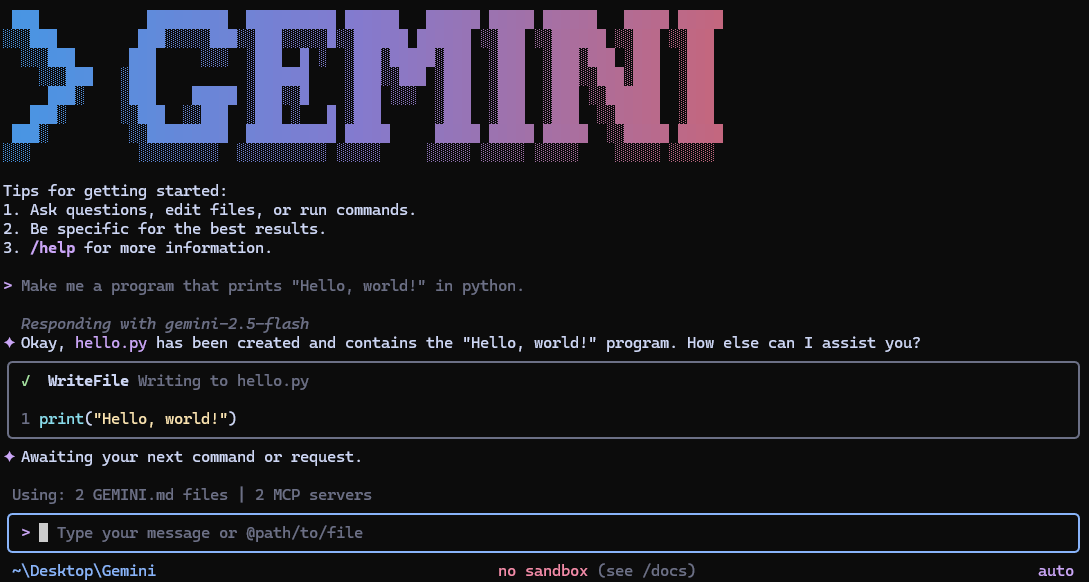
Gemini CLI is an open-source AI agent that brings the power of Gemini directly into your terminal. It provides lightweight access to Gemini, giving you the most direct path from your prompt to our model.
Learn all about Gemini CLI in our documentation (opens in a new tab).
See Gemini CLI installation, execution, and releases (opens in a new tab) for recommended system specifications and a detailed installation guide.
# Using npx (no installation required)
npx @google/gemini-clinpm install -g @google/gemini-clibrew install gemini-clisudo port install gemini-cli# Create and activate a new environment
conda create -y -n gemini_env -c conda-forge nodejs
conda activate gemini_env
# Install Gemini CLI globally via npm (inside the environment)
npm install -g @google/gemini-cliSee Releases (opens in a new tab) for more details.
New preview releases will be published each week at UTC 23:59 on Tuesdays. These
releases will not have been fully vetted and may contain regressions or other
outstanding issues. Please help us test and install with preview tag.
npm install -g @google/gemini-cli@previewpreview release + any bug fixes
and validations. Use latest tag.npm install -g @google/gemini-cli@latestnightly tag.npm install -g @google/gemini-cli@nightlyIntegrate Gemini CLI directly into your GitHub workflows with Gemini CLI GitHub Action (opens in a new tab):
@gemini-cli in issues and pull requests
for help with debugging, explanations, or task delegationChoose the authentication method that best fits your needs:
✨ Best for: Individual developers as well as anyone who has a Gemini Code Assist License. (see quota limits and terms of service (opens in a new tab) for details)
Benefits:
gemini# Set your Google Cloud Project
export GOOGLE_CLOUD_PROJECT="YOUR_PROJECT_ID"
gemini✨ Best for: Developers who need specific model control or paid tier access
Benefits:
# Get your key from https://aistudio.google.com/apikey
export GEMINI_API_KEY="YOUR_API_KEY"
gemini✨ Best for: Enterprise teams and production workloads
Benefits:
# Get your key from Google Cloud Console
export GOOGLE_API_KEY="YOUR_API_KEY"
export GOOGLE_GENAI_USE_VERTEXAI=true
gemini
For Google Workspace accounts and other authentication methods, see the authentication guide (opens in a new tab).
geminigemini --include-directories ../lib,../docsgemini -m gemini-2.5-flashGet a simple text response:
gemini -p "Explain the architecture of this codebase"For more advanced scripting, including how to parse JSON and handle errors, use
the --output-format json flag to get structured output:
gemini -p "Explain the architecture of this codebase" --output-format jsonFor real-time event streaming (useful for monitoring long-running operations),
use --output-format stream-json to get newline-delimited JSON events:
gemini -p "Run tests and deploy" --output-format stream-jsoncd new-project/
gemini
> Write me a Discord bot that answers questions using a FAQ.md file I will providegit clone https://github.com/google-gemini/gemini-cli
cd gemini-cli
gemini
> Give me a summary of all of the changes that went in yesterday/help, /chat, etc)./bug command to report issues directly from the CLI.Configure MCP servers in ~/.gemini/settings.json to extend Gemini CLI with
custom tools:
> @github List my open pull requests
> @slack Send a summary of today's commits to #dev channel
> @database Run a query to find inactive users
See the MCP Server Integration guide (opens in a new tab) for setup instructions.
We welcome contributions! Gemini CLI is fully open source (Apache 2.0), and we encourage the community to:
See our Contributing Guide (opens in a new tab) for development setup, coding standards, and how to submit pull requests.
Check our Official Roadmap (opens in a new tab) for planned features and priorities.
See the Uninstall Guide (opens in a new tab) for removal instructions.
main, last pushed 24 September 2026.SKILL.md, not by matching a directory convention. 4 distinct layouts observed: .gemini/skills/*/SKILL.md, packages/core/src/skills/builtin/*/SKILL.md, tools/caretaker-agent/cloudrun/triage-worker/.gemini/skills/*/SKILL.md, tools/gemini-cli-bot/.gemini/skills/*/SKILL.md.h1 and no skipped levels:/google-gemini/gemini-cli.md, and each skill at its own .md URL.